The MathNav Mastery System
Bring a Pencil, Leave with Mastery
Walking into class on their first day, your student may only need to bring a bag with a pencil in it. If they bought the required calculator themselves, they will need that too. On their desks they will find:
- Their textbook for the year.
- A supply of hole-punched index cards.
- A binding ring for their index card notes.
- And their calculator (if "add calculator" was included at enrollment).
Their textbook, index cards, and binder rings are all included in their enrollment fee for the year, and MathNav can have their calculator waiting, too. Just bring a pencil. Really.

Class Notes, Re-imagined
MathNav solves the note-taking problems that plague regular lectures. Your student's notes won't be taken in a notebook, but on index cards. They'll take notes only when told to, so that they don't have to divide their attention between writing and listening. They won't have to wonder about what to write down, either, because their instructor will write out exactly what they should copy down on the board for them.
They will also be told to number the index card as shown here (bottom left), and put a page number on the card (top right). The first is the number of that index card in their stack: the index card below would be their 12th index card. The page number is where they can find more information about this concept in their textbook.
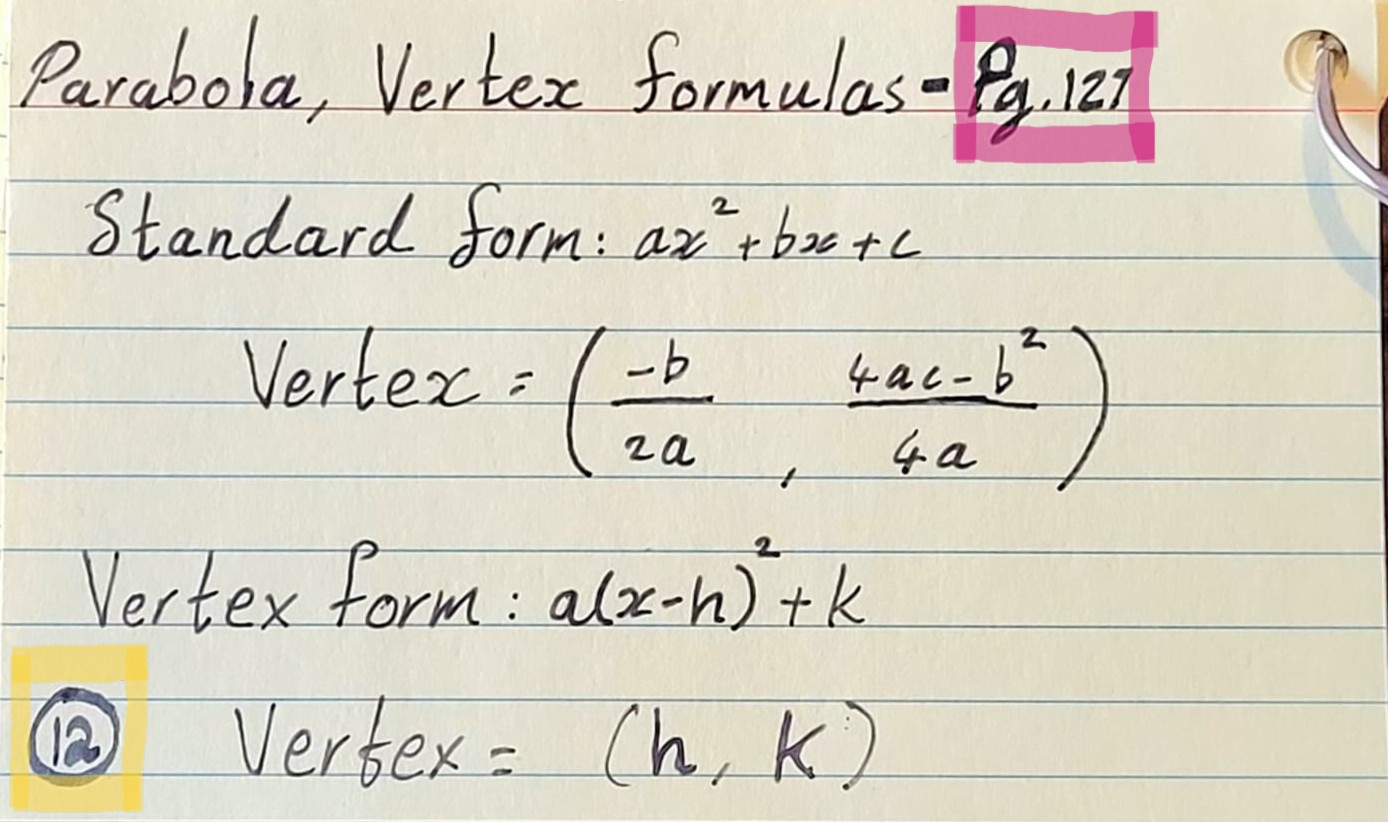
By tightening the format of their class notes, MathNav ensures the following outcomes for students:
- Every student will have a complete, high-quality notes stack for studying the concepts they will be expected to master.
- When their instructor grades an incorrect answer, they can expect feedback in the form: "check note #23!" This allows the student to go to their notes and study the exact concept that needs improvement. If the card isn't descriptive enough, they can use the page number on the card to review the relevant passage in their book.
- The lecture can remain a back-and-forth. Having students take notes during the lecture prevents conversation between the instructor and students, so dedicating moments during the lecture for note-taking restores the teacher-student conversation.
What Does This Button Do?
MathNav requires the use of a specific calculator: the Casio fx-115ES PLUS 2nd Edition. This restriction is intentional, and ensures that your student will get the most out of their calculator. The reason MathNav requires this calculator boils down to two things.
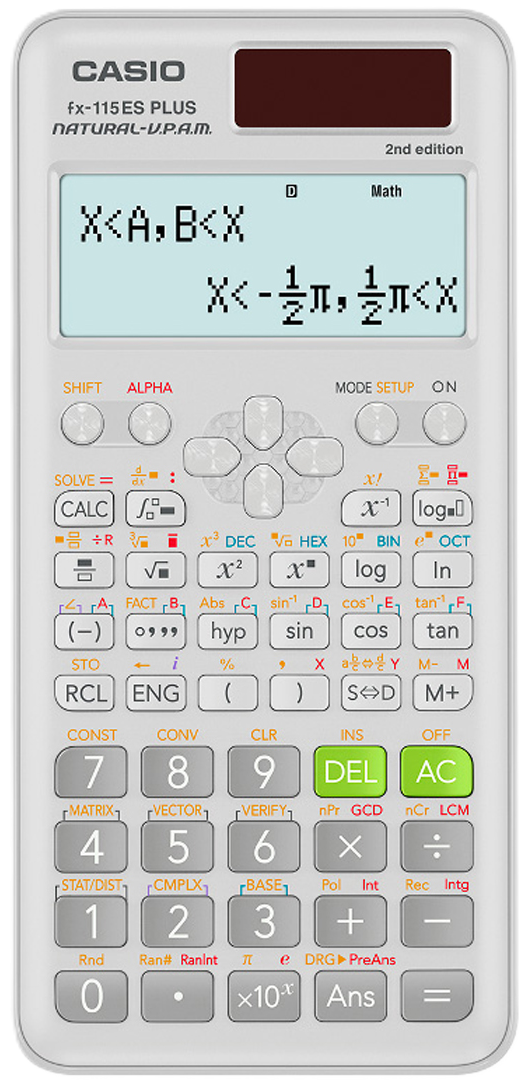
The first is display. This calculator has a large textbook-style display, meaning that fractions are displayed as fractions, rather than in the confusing slash notation ("1/2") common to in-line calculators like the TI-30 (notice the cute little half-pis in the image here). The second is ease of function. Many modern calculators, including newer Casio models, have a Math menu you have to scroll through before you can do anything complex. This system is slow (and therefore horrible for timed tests like the ACT), and unnecessary. The fx-115ES PLUS 2nd Edition provides all its functions as press, shift-press, or alpha-press options. Before you imagine that this limits functionality, the fx-115 matches or exceeds calculators like the TI-84. The only thing this calculator cannot do is show you a pretty picture of a graph, but it can do an analysis of your equation or system of equations and give you all the answers you'd be looking at a graph to find - so this is no great loss.
Standardizing the calculator across every class, from Arithmetic to Precalculus, allows for button-by-button walkthroughs during the lecture or as written feedback on homework. It allows everything your student has mastered to follow them into college, for which this calculator is also up-to-standard. Using it is fast, which translates directly into points on timed tests. And to top it off, it's about as expensive as two Big Macs, coming in at under $20.
Putting it All Together
Every week, your student will be provided with exercises that reinforce and expand what they learned during class. MathNav needs you to ensure they use no external assistance except their calculator while working on these problems. These problems, called the Practice Set, are not a part of your student's grade, because the point is not to get these problems right (although they should try to do so). The point is to do three things:
- Practice without pressure. MathNav expects your student to attempt every problem with the intention of solving it. However far they get, that's good practice.
- Get targeted feedback in a low-stakes environment. If your student makes a mistake, or many mistakes, these will each be addressed with targeted feedback. MathNav's goal with feedback is always that the student knows exactly what to improve, and has the tools to improve it.
- Test themselves. Students should not be allowed external assistance because attempting everything "raw" allows them to recognize their own gaps and will motivate them to improve. In short, this keeps them honest with themselves about their progress and comprehension.
Each month or so, MathNav gives a Mastery Test, which will be included in each student's grade. This test will be a comprehensive mastery exam, taken at home without assistance, but also with no time limit, covering all content up to the exam date. The tests are difficult, and require true mastery to pass, so that you can know that a passing score indicates that your student knows the material they should. These high standards also serve a second purpose: retakes are not only allowed but encouraged for all mastery tests (and the final exam, more on this below). When a student gets a low score on a mastery test, the instructor will combine notes-based, calculator-based, and textbook-based feedback to provide the "what" and "how" for necessary improvements. After one week to brush up, they can retake the exam.
The final exam is the final mastery test. It has the same format and requirements as the mastery tests, and can also be re-taken after feedback and one week to study.